http://www.blogger.com/img/blank.gif
Microsoft Office 2010 - one of the best office suite for computers, phones and browsers, including features, you can rely on today, and the opportunities that may be required in the future. This set of applications allows you to confidently take up the challenge of today's economic situation, not losing sight of the factors necessary for success in the field of information technology.
Members package Microsoft Office Professional Plus 2010 :
* Microsoft Excel 2010
* Microsoft Outlook 2010 with Business Contact Manager *
* Microsoft PowerPoint 2010
* Microsoft Word 2010
* Microsoft Access 2010
* Microsoft InfoPath 2010
* Microsoft Communicator *
* Microsoft Publisher 2010
* Microsoft OneNote2010
* Microsoft SharePoint Workspace 2010
* Microsoft Office programs for the Web
* Additional integrated solutions, such as support for enterprise content management (Enterprise content management, ECM), electronic forms, information law and policy
Antara pembaharuan dalam version nieh ialah :
1. Ribbon Menu baru yang telah diupgrade
2. Fungsi edit gambar yang diupgrade dalam Microsoft Office
3. Kebolehan memasukkan video dalam pelbagai format dalam Microsoft PowerPoint
4. Animation baru di dalam Microsoft Powerpoint
5. Microsoft Publisher yang telah diupgrade
6. Built in Save to PDF dalam Microsoft Office
7. Stabil, laju dan ringan [Ini yang ahpek suka !!]http://www.blogger.com/img/blank.gif
Direct Link Ntuk Download :
http://care.dlservice.microsoft.com/dl/release/0/1/7/017702EB-0977-42A9-A1A9-593DFC1150EE/14.0.4763.1000_ProfessionalPlus_retail_ship_x86_en-us_exe/ProfessionalPlus.exe
Serial :
BDD3G-XM7FB-BD2HM-YK63V-VQFDK
Office 2010 Toolkit and EZ-Activator v2.0.1 - Activator Ntuk Auto-Reset Bila Dah Sampai 180 : [Kekal Active Selamanya][NEW]
Multi-activator of Office 2010. Includes a set of tools for managing licenses and activation. You can also put on some activation is one component of the office, only Word or Excel. Works with all versions of Office 2010. It can use the KMS-activated, even if you are using a retail Retail license. This set of tools for managing licenses and activation of Office 2010. The result of all the functions displayed in the information in the console window. All operations are performed in the background, and a graphical interface is disabled to prevent multiple execution functions, since this could lead to instability or damage to the Office 2010. Options AutoKMS Uninstaller, AutoRearm Uninstaller, Office Uninstaller and Product Key Checker work, even though Office 2010 is not installed.
Some features:
* Activation of Office 2010 (Using KMS)
* Retail transformation in Volume License (VL)
* Reset the trial counter
* Add a working key
* Check your product key
* View the status of activation
* Backup License
* Remove Office
Account the requirements:
Download Microsoft. NET Framework 3.5 here [For Windows XP User] http://www.mediafire.com/?wmmrddwydis and Install..Windows Seven already built in..
Changelog / Changes in 2.0.1:
-Added ID to INI file. This is to prevent using an old INI with newer version that would result in a crash.
-Added Daily Tasks for AutoKMS and AutoRearm
-AutoKMS can now KMS activate Windows
-AutoRearm can now convert Retail to VL automatically to eliminate nags
-Automatically Delete KMS Keygen and Hostname are now disabled by default.
-Better error recovery and notification.
-Fixed false success in EZ-Activator if KMS Keygen got deleted by AV.
-Removed Tokens Only Restore - It just doesn't work and nobody uses it as the Full Restore is always needed.
-Starting KMS Keygen is now the first thing done during activation so if AV causes failure we don't waste time.
-Using Modded KMS Emulator (By Phazor) to lessen amount of AV false positives.
Download :
http://goo.gl/jyglH
Cara2 Apply Crack:
1] Pastikan disable dulu apa2 Anti-Virus dan Anti-Malware pastu Right Click Dekat Patch Office 2010 Toolkit.exe dan Pilih Run as administrator
2] Pastu tekan button "EZ-Activator" dan tunggu report yang mengatakan activation telah berjaya.
Kepada sesiapa yang tak dapat install Office 2010 nieh kerana gagal uninstall Office 2007
ATAU
Kepada sesiapa yang ada problem,
Microsoft Office rearm failed!
Here is a more detailed description about the error:
Error: 0xc004fe00
On a computer running Microsoft Windows non-core edition, run 'slui.exe 0x2a 0xc004fe00' to display the error text.
Cara dier Uninstall balik Office 2010 korang [Buat complete uninstall dan pakai tool kat bawah nieh ntuk buat complete uninstall] pastu crack balik
sila pakai Uninstall nieh :
http://go.microsoft.com/?linkid=9669698
P/S : Sila restart lepas uninstall, pastu baru install Office 2010..
Ntuk uninstall Office 2010 :
http://go.microsoft.com/?linkid=9737366
Layan !!
Saturday, January 22, 2011

Saturday, July 3, 2010
Registry Booster 2010 Serial Number
-RB-T53TA-SM5XD-CYJXM-XL3B2-D7PT3-HY9YD
-RB-OHQWX7-NWYFTU-BHTBRO-QXT6JH-PVC32D
I hope you enjoy this program :)
-RB-OHQWX7-NWYFTU-BHTBRO-QXT6JH-PVC32D
I hope you enjoy this program :)
Download RAMMap For Free Analysis of Memory Usage In Windows 7
In order for Windows users to gain understanding on how Windows is assigning physical memory, how much file data is cached in RAM, or how much RAM is used by the kernel and device drivers, Windows Sysinternals team has released an advanced physical memory usage analysis utility for Windows Vista and higher version of Operating System including Windows 7, which is called as RAMMap. With RAMMap, the users able to gain understanding of the way Windows manage memory, to analyze application memory usage or to answer specific questions about how RAM is being allocated. Besides that, the memory analysis utility tool also supports saving and loading snapshots of the display result.
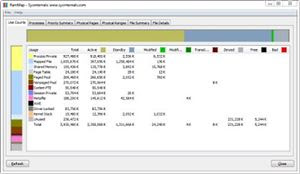
The usage information which provides by RAMMap includes:
* Use Counts: usage summary by type and paging list.
* Processes: process working set sizes.
* Priority Summary: prioritized standby list sizes.
* Physical Pages: per-page use for all physical memory.
* Physical Ranges: physical memory addresses.
* File Summary: file data in RAM by file.
* File Details: individual physical pages by file.
The RAMMap works well in Windows Vista, Windows 7, Windows Server 2008 and higher.
Download RAMMap version 1.0 (direct download link): http://download.sysinternals.com/Files/RAMMap.zip
Thursday, March 25, 2010


Setting Prefs for the Mozilla Rich Text Editing Demo
For Firefox:
- Quit Firefox. If you have Quick Launch running (in Windows, an icon in the toolbar), quit that too.
- Find your Firefox profile directory. On Windows, this is often located in
C:\Documents and Settings\
\Application Data\Mozilla\Firefox\Profiles\ . - Open the
user.jsfile from that directory in a text editor. If there's nouser.jsfile, create one. -
Add these lines to
user.js:user_pref("capability.policy.policynames", "allowclipboard");
user_pref("capability.policy.allowclipboard.sites", "http://www.mozilla.org");
user_pref("capability.policy.allowclipboard.Clipboard.cutcopy", "allAccess");
user_pref("capability.policy.allowclipboard.Clipboard.paste", "allAccess");*Change the url "http://www.mozilla.org" to where you want to enable this function.
- Save the file, and restart Firefox. The Clipboard buttons should now function.
Note: The preference is site as well as protocol specific. For example
user_pref("capability.policy.allowclipboard.sites", "http://www.mozilla.org") is not the same as user_pref("capability.policy.allowclipboard.sites", "https://www.mozilla.org") (the first is http and the second is https) If you want to allow multiple urls to access the Paste operation, separate the urls with a space. For example:
user_pref("capability.policy.allowclipboard.sites",
"http://www.mozilla.org https://www.mozilla.org")
Wednesday, July 8, 2009
Fix Your Streamyx Problem Today by Using TMnet Proxy
Guys, if you having packet loss problem now with streamyx, you can use these proxies.
Usable proxy list:
cdn-kmr-c2100-01.tm.net.my:3128
updated: 20/05/2009
Firefox setting:
Tools ->Options->Advance->Network->Settings

Internet Explorer Setting:
Tools -> Internet Options -> Connections -> Lan Settings


Notes: If you happen to get error message while surfing the net using this proxy, which means this proxy is no longer usable.
Malwarebytes Anti Malware 1.46 Full +Serials [UT].rar
http://www.filehippo.com/download_malwarebytes_anti_malware/
Download Here :
It program anti -malware, download and install
Use this to register
- 9VB44
P26D-NUV5-1KVV-Y1VW
- 6AH57
CUTB-2A70-XMYF-DND5
- 2XJ77
U3AH-N84G-2ME4-AWWN
Download Here :
Tool to speed up Download
http://www.internetdownloadmanager.com/Keygen IDM v5.18
4E620-52LZF-NF2J1-VVCPP
CJBQV-J7ERN-S1LCL-PKT0K
0SFZY-PEJ5K-1RIJS-RUEN8
N9JB2-K9ZIC-NFZ11-A8UF4
If detect error with serial use this patch, can be download at
- Go to this Website and download installer IDM V5.18
- After finishing use this serial to registered
4E620-52LZF-NF2J1-VVCPP
CJBQV-J7ERN-S1LCL-PKT0K
0SFZY-PEJ5K-1RIJS-RUEN8
N9JB2-K9ZIC-NFZ11-A8UF4
If detect error with serial use this patch, can be download at
TuneUp UtiIities 2o10
http://www.tune-up.com/download/
This is for 32bit OS Machines
Company=+TE2010+
UserName=Twisted EndZ
ProductKey=DONTHA-TETHEH-ACKERH-ATETHE-CODE10
This is for 64bit OS Machines
Company=+TE2010+
UserName=Twisted EndZ
ProductKey=DONTHA-TETHEH-ACKERH-ATETHE-CODE10
Crack Here http://www.4shared.com/file/249381614/ff62145f/Crack.html
This is for 32bit OS Machines
Company=+TE2010+
UserName=Twisted EndZ
ProductKey=DONTHA-TETHEH-ACKERH-ATETHE-CODE10
This is for 64bit OS Machines
Company=+TE2010+
UserName=Twisted EndZ
ProductKey=DONTHA-TETHEH-ACKERH-ATETHE-CODE10
Crack Here http://www.4shared.com/file/249381614/ff62145f/Crack.html
Performance Increase Through My Computer
Performance Increase Through My Computer
1: Start > Right Click on My Computer and select properties.
2: Click on the "Advanced" tab
3: See the "Perfomance" section? Click "Settings"
4: Disable all or some of the following:
Fade or slide menus into view
Fade or slide ToolTips into view
Fade out menu items after clicking
Show Shadows under menus
Slide open combo boxes
Slide taskbar buttons
Use a background image for each folder type
Use common tasks in folders
There, now Windows will still look nice and perform faster
Optimize Broadband & Dsl Connections
These settings allow you to boost the speed of your broadband Internet connection when using a Cable Modem or DSL Router with Windows 2000 and Windows XP.
Open your registry and find the key below.
Create the following DWORD values, as most of these values will not already exist you will need to create them by clicking on 'Edit -> New -> DWORD Value' and then set the value as shown below.
DefaultTTL = "80" hex (or 128 decimal)
Specifies the default time to live (TTL) for TCP/IP packets. The default is 32.
EnablePMTUBHDetect = "0"
Specifies whether the stack will attempt to detect Maximum Transmission Unit (MTU) routers that do not send back ICMP fragmentation-needed messages. The default is 0.
EnablePMTUDiscovery = "1"
Specifies whether the TCP/IP stack will attempt to perform path MTU discovery as specified in RFC 1191. The default is 1.
GlobalMaxTcpWindowSize = "7FFF" hex (or 32767 decimal)
Specifies the system maximum receive window size advertised by the TCP/IP stack.
TcpMaxDupAcks = "2"
Determines the number of duplicate ACKs that must be received for the same sequence number of sent data before "fast retransmit" is triggered.
SackOpts = "1"
Enables support for selective acknowledgements as documented by Request for Comment (RFC) 2018. Default is 0.
Tcp1323Opts = "1"
Controls RFC 1323 time stamps and window scaling options. Possible values are: "0" = disable RFC 1323 options, "1" = window scale enabled only, "2" = time stamps enabled only and "3" = both options enabled.
TcpWindowSize = "7FFF" hex (or 32767 decimal)
Specifies the receive window size advertised by the TCP/IP stack. If you have a latent network you can try increasing the value to 93440, 186880, or 372300.
Exit your registry and restart Windows for the changes to take effect.
If you don’t want to edit the registry, here's a little TCP utility that is ideal...
http://www.broadbandreports.com/front/doctorping.zip
Improve your dialup modem preformance
You can't assume that just because you connected at a speed like 48.3KBps that you will stay there. Today's modems automatically fall back to a lower speed if the line noise is too high to maintain a faster connection, but sometimes they fall back too soon or too far.
Here's how to do it:
Click Start the button.
Select Settings.
Click Control Panel.
Double-click on the Modems icon.
Select your modem.
Click the Properties button.
Click the Connections tab.
Click the Advanced button.
In the "Extra settings" field, type S36=7
Click OK to save your settings.
This will force your modem to try to stay connected at high speeds in two different ways before dropping back to an asynchronous mode with auto speed buffering.
How To Use You Gmail With Msn Messenger
i think all of you know it but if someone dont than here it is
go to this page:
https://register.passport.net/default.srf?sl=1
enter you gmail account as the email address
fill all the other blanks and continue the registration
go to your gmail account and verify the registration and know sign in with msn
actually this works will all emails not only gmail
How To optimize DSL-CABLE connection speed
How To optimize DSL-CABLE connection speed
First, u need to goto Start, then run. Type in regedit in the box. Next, goto the folder HKEY_LOCAL_MACHINE\System\CurrentControlSet\VxD\MSTCP
Now, find the string DefaultRcvWindow . Now, edit the number to 64240 then restart your computer. There you go. High speed cable modem now with out dloading a program. Original value is 373360
how to make a new web site
how to make a new web site
http://www.make-a-web-site.com/
http://www.pagetutor.com/pagetutor/makapage/index.html
www.webmonkey.com
Colour Palletes
http://colormatch.dk
HTMLlock <---Need
http://www.devside.net
http://www.devside.net/download/crypto/disclaimer1.html
well, if you want text seperate from image, you could just do this:
your text here, it's totally fun, yeah yeah yeah |
if you want to have the image on the left side, and text on the right side, just reverse the code like so:
your text here, it's totally fun, yeah yeah yeah |
How To Increase Download Speeds By 100-200 Kbsec
First of all download this wonderful program:
h@@p://www.speedguide.net/files/TCPOptimizer.exe
Then when u start trhe program goto settings goto cable modem or dsl whatevcer u have.
Go to MaxMTU and set it to 1500 this is optimal anything above this will not work as well.
Or download advanced system care v3.3.1(2009) free at download.com
account name - raymond.cc
licience code - AF0B-AF0B-A0FF-6767
click internet booster and choose setting
Thats bout it!! Enjoy the speed!!
How to fix corrupted files in XP
//////////////////////////////////////////////////////////////////////////////////
// ** How to fix corrupted files in XP ** //
// ** This tutorial was writing by: H|LLJD00 ** //
//////////////////////////////////////////////////////////////////////////////////
// ** H|LLJD00 does not take any responsibility for your actions ** //
// ** H|LLJD00 takes no responsible for any damage caused by this tutorial ** //
//////////////////////////////////////////////////////////////////////////////////
** Contents **
(1) Introduction
(2) Required
(3) Actual Tutorial
(4) Copyright Notice
// Introduction //
This tutorial has been made so people that are having problems with corrupted files, can learn how to fix them easy.
// Required //
+ Windows XP operating system
+ Windows XP cd
// Right to the tutorial //
+ Place the xp cd in your cd/dvd drive
+ Go to start
+ run
+ type in 'sfc /scannow' (without the ')
Now it should all load, and fix all your corrupted file on windows XP :)
////////////////////////////////////////////////////////////////////////////////////////////////////////////////////
// ** (c) Copyright 2003 H|LLJD00. All Rights Reserved ** //
// ** If you wish to use this tutorial on your website please leave all credit and detials as it is. Thank you ** //
////////////////////////////////////////////////////////////////////////////////////////////////////////////////////
How To Download Bittorrent Files
Downloading BitTorrent Files
What is BitTorrent in Plain English?
BitTorrent is a program you download. It is similar to a peer-to-peer file sharing service. Basically it goes like this: You download the installer. You get the link to a file that ends in .torrent and enter that URL into your browser (preferably Internet Explorer). This opens the BitTorrent download window. It starts downloading the file, or episode that you wanted (eg. alias2x01.torrent). As it downloads, it uploads the parts that you have to other people so many people can get it at once. When you've finished downloading the file, you can leave the window open (don't press finish or close the window) and other people can still download from you. This is very much encouraged.
I'm new to all this. How do I download with BitTorrent???
First we need to download and install a BitTorrent client
Official client 3.3
CODE
http://www.bitconjurer.org/BitTorrent/index.html
Experimental client 3.2.1b-2
CODE
http://ei.kefro.st/projects/btclient
TheShad0w Experimental S-5.8.3
CODE
http://home.elp.rr.com/tur
Azureus 2.0.3.0
CODE
http://azureus.sourceforge.net/
burst! RC5d
CODE
http://krypt.dyndns.org:81/torrent/download.phtml
BT++ 0.5.4 alpha [code]http://btplusplus.sourceforge.net
Shareaza 1.8.9.22
CODE
http://www.shareaza.com
Nova Torrent 0.2.0
CODE
http://blackflaw.dyndns.org
SimpleBT 0.1.9
CODE
http://sourceforge.net/projects/simplebt
BitAnarch 1.0.5a
CODE
http://sourceforge.net/projects/bitanarch/
Personal Torrent Collector 0.8.2.2
CODE
http://ptc.sourceforge.net
Effusion 0.3.3 beta
CODE
http://www.azrael-uk.f2s.com/az/effusion
Snark 0.5 beta
CODE
http://www.klomp.org/snark
ByteTorrent 0.95
CODE
http://sourceforge.net/projects/bytetorrent/
ABC 2.5
CODE
http://pingpong-abc.sourceforge.net
U Torrent v1.83
It very easy bittorrent client to use
Note:
If you?re client freezes during D/Ls, it?s a problem with you?re network card or modem, this happens when you connect to more peers than you?re card or modem can handle & windows shuts it down. There is a cure. Shad0ws Experimental client allows you to set how many incoming peers to allow.
All about BT:
CODE
http://www.dessent.net/btfaq/#now_what
How to D/L Torrent files
BitTorrent is not like other peer-to-peer applications (such as Winmx, Kazaa, Gnutella, etc.) in that it does not have its own \"universe.\" Put another way, BT lives on top of the Web, which means that all of the searching/listing of available files is done on the web. When you find a file you want to download, you click on it and the BitTorrent client program will run and ask you where to put it, and then start downloading. Or you save target as. Save the file somewhere then click on it when you?re ready to start the D/L.
It doesn't do anything it says:
Problem connecting to tracker - timeout exceeded
Problem connecting to tracker - HTTP Error 503: Connect failed
Problem connecting to tracker - [Error socket error] (10061, \" Connection refused\")
Problem connecting to tracker - (111, \'Connection refused\'
Generally just wait ... this normally means that the \'Tracker\' is maybe too busy. Leave your window open and it will try to connect every 2 minutes or so.
Note: BT dose resume downloads, just click the torrent file again when you are ready to resume the D/L and save it to same place as the original. All clients have an option for default D/L directory. I suggest setting this option.
My speed is always very slow!!!!!!!!!!
Speeds can be real slow if your one of the below, they all can bet set to allow BT in and out
#1 behind a firewall
#2 behind a router
#3 on a network
#4 Xps firewall is enabled
ports 6881 thru 6999 need to be open to get good speeds
If you need info on bit torrent and how to set it up with a firewall or router
CODE
http://knowbuddy.dyndns.org/torrent/btclientconfig.html
Get general info on how torrent works and how it uses ports
CODE
http://knowbuddy.dyndns.org/torrent/btclientconfig.html
http://www.dessent.net/btfaq/
Where do I get torrent files???
Suprnova mirrors are the best site?s, updated every 20 minutes.
CODE
Torrentz
http://www.Torrentz.com
It the best because torrentz has a another site torrent,a nd many tracker can be use to speed download
CODE
http://www.suprnova.org
There are others you can use here is another one:
CODE
http://www.torrentbox.com
Places to find other torrent sites
CODE
http://torrentlinks.com/index.php?action=displaycat&catid=10
http://members.chello.nl/~p.wiersema/
http://home.quicknet.nl/qn/prive/romeria/bittorrentsites.htm
Torrent Search engine
CODE
http://novasearch.net/
Keeping up with the torrent network
CODE
http://www.digital-update.com/forums/attachment.php?s=&postid=163113
http://www.filesoup.com/phpBB2/index.php
http://www.lickmytaint.com/
http://suprnova.org/
PeerGuardian
What does PeerGuardian actually do?
PeerGuardian does two things to help P2P users. The first is the obvious one, it closes connections on certain IP addresses. The second is that it optionally logs all connections made to your computer. The reason for this is so that if you do use PeerGuardian but still get sent a legal threat, you can cross-reference the date/time of the alleged infringement with the log. This gives us a list of IPs, one of which will be the IP that's doing the busting. It's basically to help us identify which IPs are doing the busting and weren't known to PeerGuardian before. - Hope that makes sense.
Is PeerGuardian 100% Protection?
CERTAINLY NOT!!! - PeerGuardian relies on users sharing information to stay up to date. It IS contributory to protection and (I'm not trying to blow my own trumpet here!!) it seems to be the most up-to-date and open database of this nature on the internet (as far as I know). The more people who are using full-logging and report the relevant IPs when they get a C&D threat (see above paragraph), the more people we can save. ANONYMOUS P2P is the way ahead IMHO, PeerGuardian isn't 100% effective.. I've NEVER claimed that and never will and I look forward to the day that PG (not just the app, more.. the database and communication between p2p'ers on blocking IPs) becomes totally redundant. I'm just trying to help supply the next-best thing until we get to that stage.
I use PeerGuardian and have still been sent a legal threat.
What do I do?
First of all, stop sharing the file you got busted with. If you're worried, try sharing older/rarer files. If you share Bourne Identity, Terminator 3 and a load of Busta Rhymes mp3s after being busted, you'll be asking for trouble. Second thing to do, check the "full connection log" in PeerGuardian. (you did have it enabled didn't you?) - Work out the difference in timezones on the infringement warning and cross-reference it with the log. From this you should be able to identify a handful of IPs. Either post that list to the PG forums for one of our admins/moderators/members to investigate or investigate it yourself and post the p2p enemy IP to the on-line database. - There are plans to automate this whole process in the future.
CODE
http://www.peerguardian.net/
Well it isn't really much of a tutorial but I spent a lot of time on this so please help me out if it is wrong.
-=-Bullet-T00th-=-
How To Boot Xp Faster (updated)
First of all, this tweak only apply to those who only have one HDD on their primary IDE channel (nothing else on device 0 or 1) and a CD-ROM and/or DVD-ROM on the secondary IDE channel. Each time you boot Windows XP, there's an updated file called NTOSBOOT-*.pf who appears in your prefetch directory (%SystemRoot%Prefetch) and there's no need to erease any other files as the new prefetch option in XP really improves loading time of installed programs. We only want WindowsXP to boot faster and not decrease its performance. Thanks to Rod Cahoon (for the prefetch automation process...with a minor change of mine) and Zeb for the IDE Channel tweak as those two tricks, coupled together with a little modification, result in an EXTREMELY fast bootup:
1. Open notepad.exe, type "del c:windowsprefetch tosboot-*.* /q" (without the quotes) & save as "ntosboot.bat" in c:
2. From the Start menu, select "Run..." & type "gpedit.msc".
3. Double click "Windows Settings" under "Computer Configuration" and double click again on "Shutdown" in the right window.
4. In the new window, click "add", "Browse", locate your "ntosboot.bat" file & click "Open".
5. Click "OK", "Apply" & "OK" once again to exit.
6. From the Start menu, select "Run..." & type "devmgmt.msc".
7. Double click on "IDE ATA/ATAPI controllers"
8. Right click on "Primary IDE Channel" and select "Properties".
9. Select the "Advanced Settings" tab then on the device 0 or 1 that doesn't have 'device type' greyed out select 'none' instead of 'autodetect' & click "OK".
10. Right click on "Secondary IDE channel", select "Properties" and repeat step 9.
11. Reboot your computer.
WindowsXP should now boot REALLY faster.
Getting A 1gb Yahoo China Account
Getting A 1gb Yahoo China Account
1. Sign for a yahoo ID... you can do this in my.yahoo.com. DO NOT check the automatically create an Email address
2. Clear ALL cookies
3. Activate mail account at cn.mail.yahoo.com
(you get 100Mb storage first *don't worry*), then sign-out
NOTE: FYI, the two boxes in the activation page is lastname and firstname
Upgrading to 1Gb Yahoo China Account
1. Sign-in to Yahoo Messenger, add a contact, sign-out
2. Go back to cn.mail.yahoo.com (all pages would be in Chinese)
3. Click the 1G orange label (graphic) *look at the lower right of the page*
4. Type-in your Yahoo ID and Password *look at the bottom of the page*
5. You'll go to two more Chinese pages (Just click the bottom centered label in the page)
6. Tadah!! Your upgraded to 1Gig and your default is English with Free POP3
There's no pesky graphic or flash ads at the moment... but your email add would be username[at]yahoo.com.cn
I think that's good enough for people without Gmail
Subscribe to:
Posts (Atom)